
[ภาษาไทย] วิธีฝากผ่านแอปพลิเคชัน | วิธีฝากผ่านเว็บไซต์
[EN] Instructions for Web Browser | Instructions for Mobile App
วิธีฝากผ่านแอปพลิเคชัน
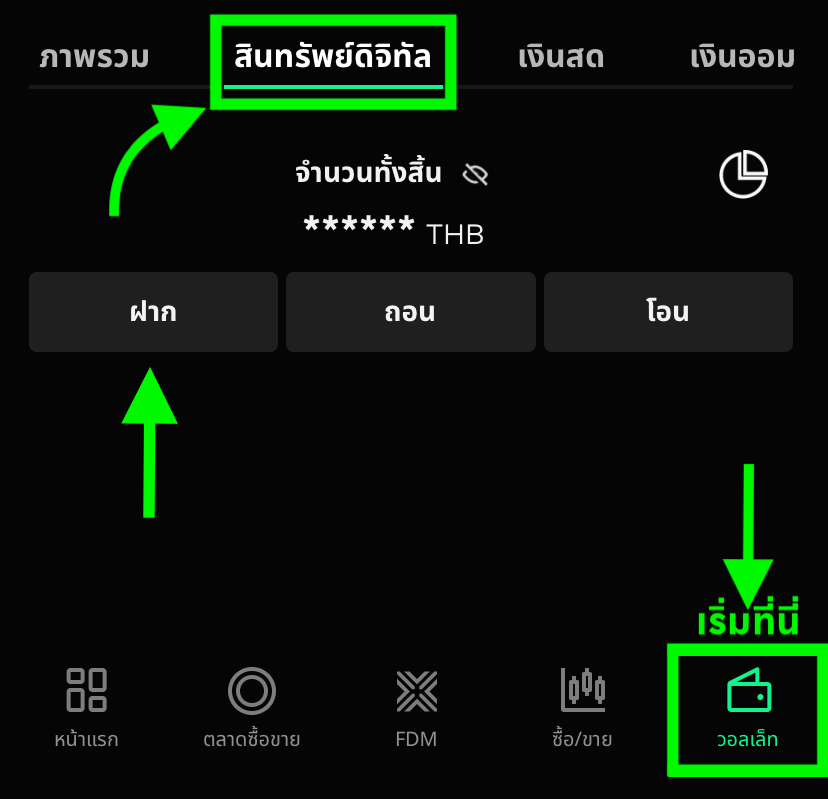
1. ไปยังแท็บวอลเล็ท เลือกสินทรัพย์ดิจิทัล และกดที่ปุ่มฝาก
2. กดเลือกสินทรัพย์ดิจิทัล เครือข่ายที่ต้องการฝาก และกดที่ต่อไป 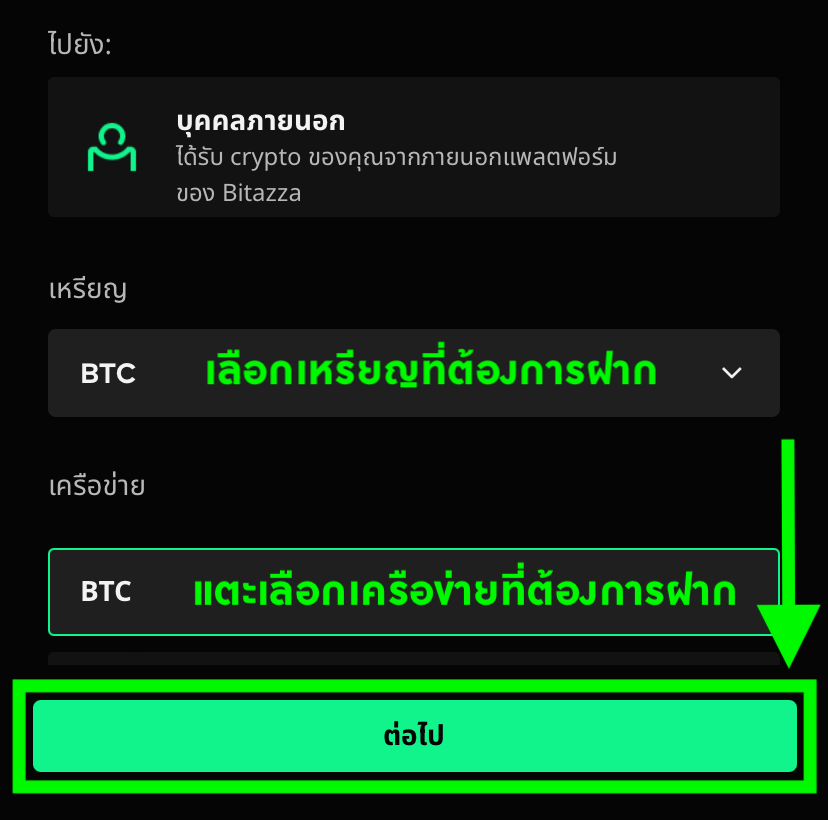
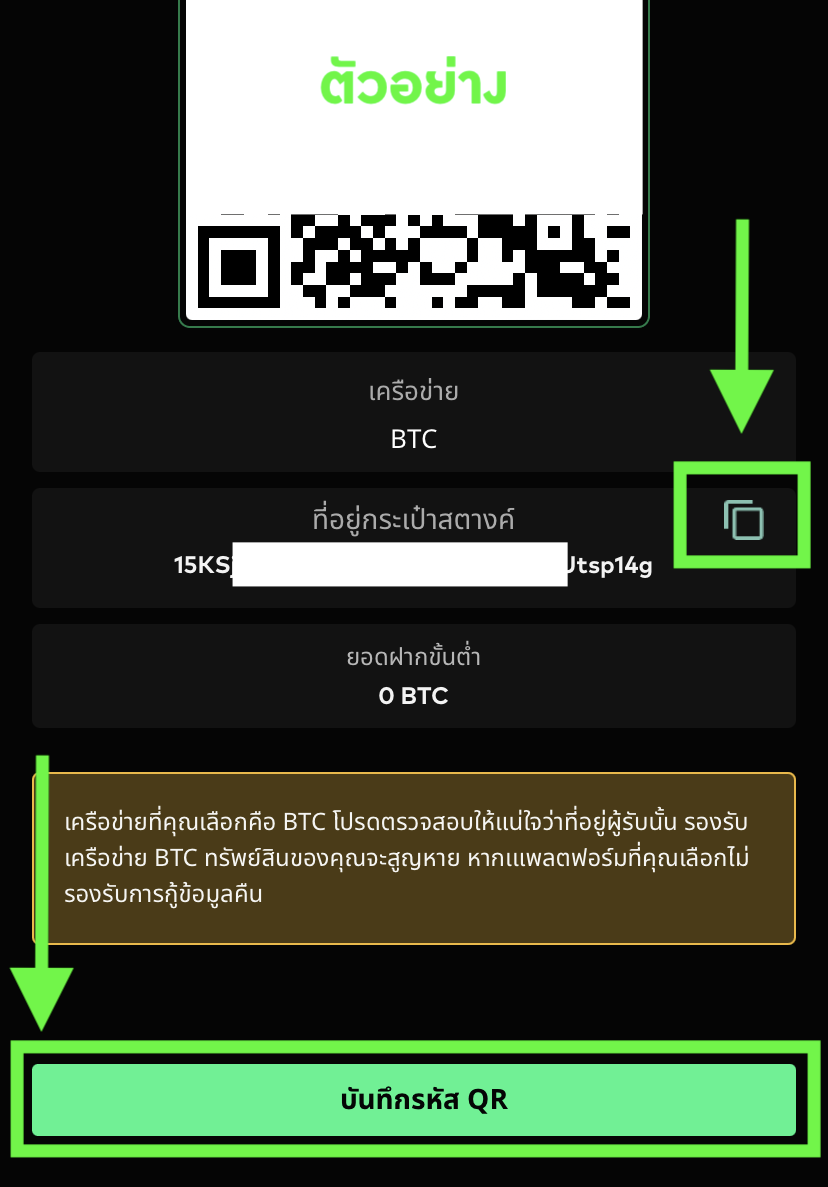
3. จากนั้นกดที่อยู่สำหรับฝากเหรียญ เพื่อให้ระบบแสดง QR Code และที่อยู่กระเป๋าสตางค์สำหรับฝากสินทรัพย์ดิจิทัล คุณสามารถสแกน QR Code หรือคัดลอกที่อยู่กระเป๋าสตางค์ไปวางที่แพลตฟอร์มต้นทางที่ต้องการฝากเข้ามา
ในบางโทเคนเช่น XRP, XLM, LUNC, และ LUNA นอกจากที่อยู่กระเป๋าสตางค์แล้ว คุณยังต้องคัดลอกสิ่งที่เรียกว่า Destination Tag หรือ Memo Tag อีกด้วย โปรดตรวจสอบให้แน่ใจว่าคุณคัดลอกข้อมูลทั้ง 2 ชนิดไปยังต้นทางอย่างถูกต้อง ไม่เช่นนั้นโทเคนของคุณอาจสูญหายได้การส่งสินทรัพย์ดิจิทัลอาจใช้เวลาถึง 1 ชั่วโมง ขึ้นอยู่กับที่อยู่กระเป๋าสตางค์ และเครือข่ายที่คุณต้องการส่ง การฝากสินทรัพย์ดิจิทัลจากแพลตฟอร์มเอ็กซ์เชนจ์ (Exchange) อื่นๆอาจใช้เวลานาน เนื่องจากระบบจะต้องยืนยันการประมวลผลจากเครือข่ายบล็อกเชนวิธีฝากผ่านเว็บไซต์
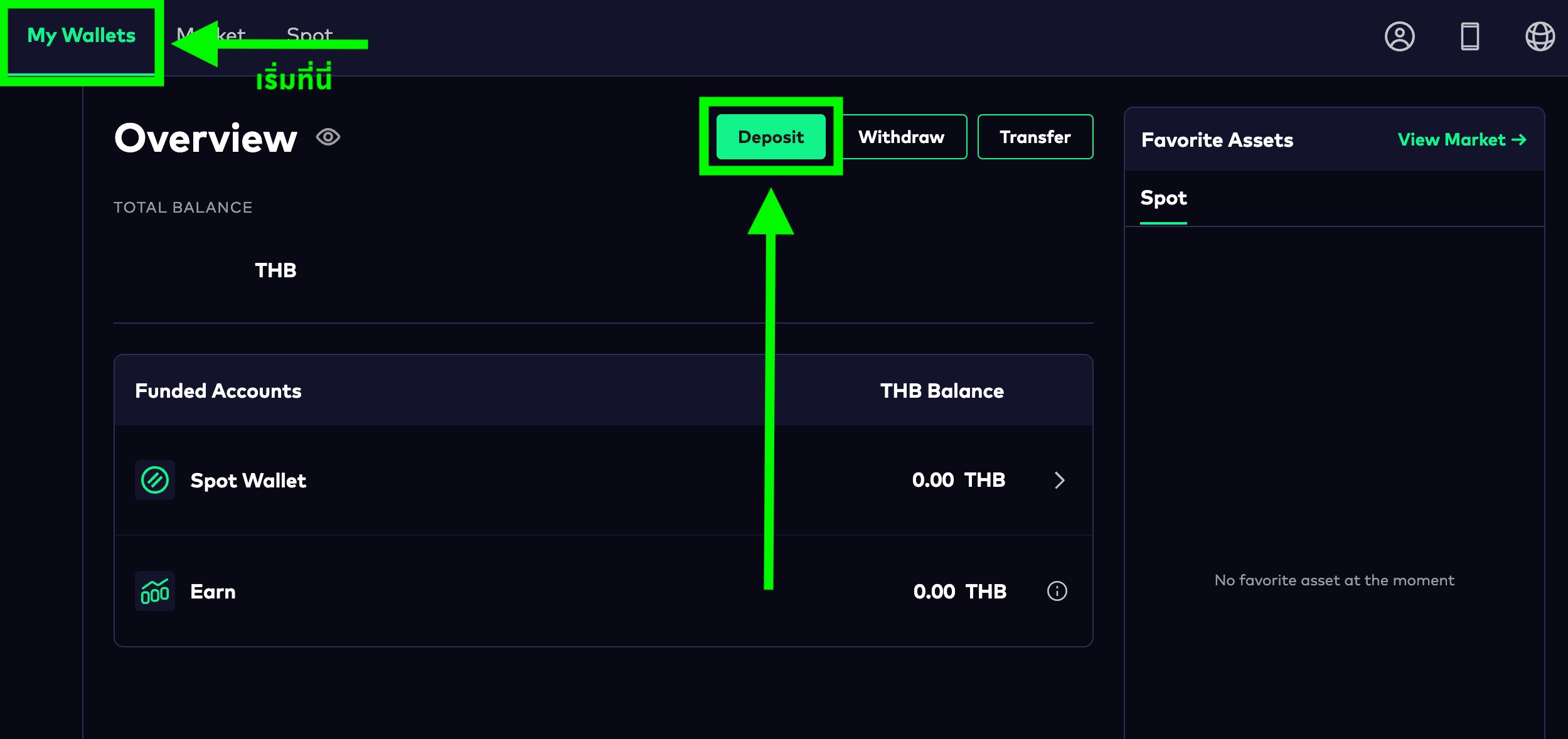
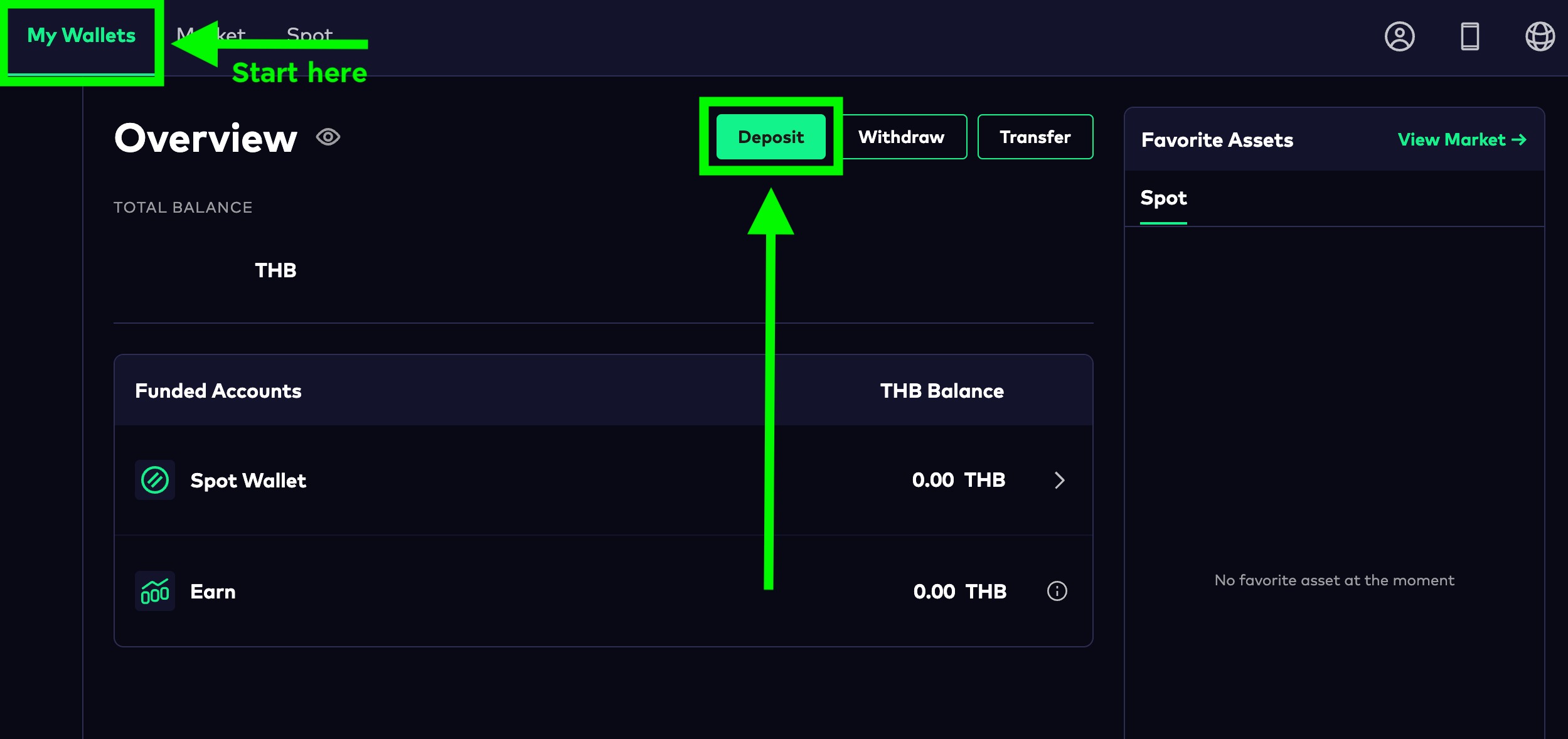
1. คลิกที่ปุ่ม 'Deposit' จากหน้า 'My Wallets' ของคุณ
2. กดที่ปุ่มสกุลเงินไทยบาท (THB) จากนั้นเปลี่ยนเป็นเหรียญที่คุณต้องการฝาก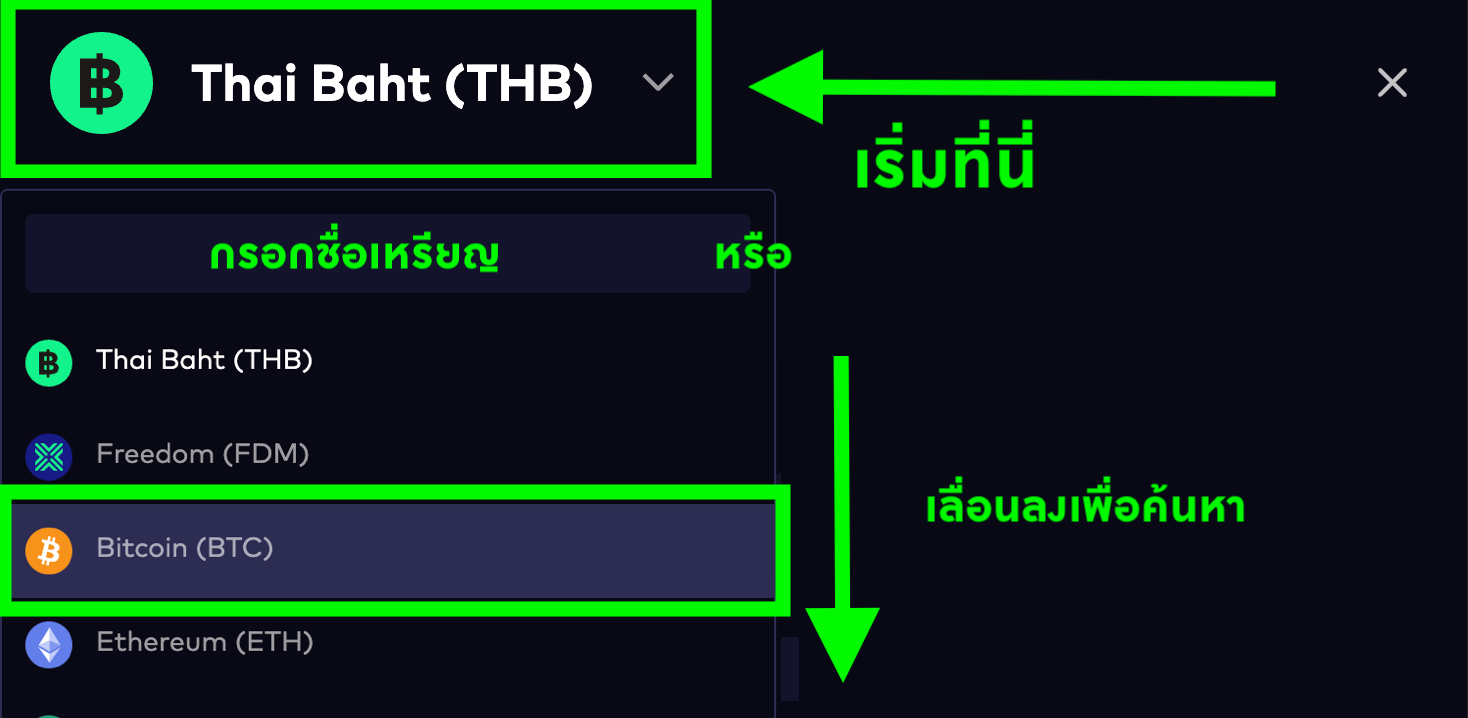
3. เลือกเครือข่ายให้ตรงกับต้นทางที่คุณต้องการฝาก จากนั้นกดที่ปุ่ม 'Generate Deposit Address' *เครือข่ายของผู้รับและผู้ฝากจะต้องเป็นเครือข่ายเดียวกัน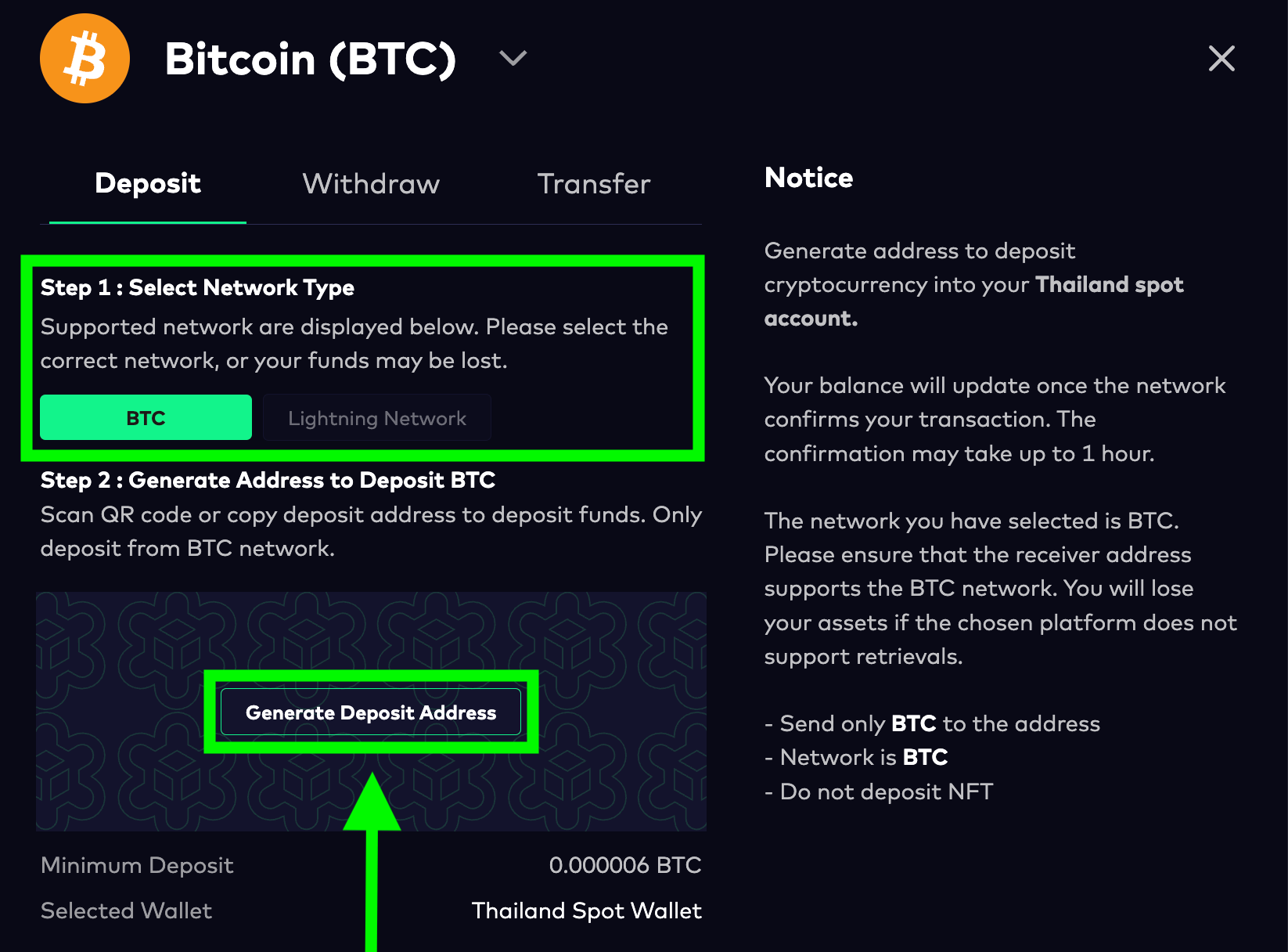
ในการคัดลอกที่อยู่กระเป๋าสตางค์ทางเราขอแนะนำให้ใช้ปุ่ม 'Copy' ที่ด้านขวามือเพื่อให้คัดลอกที่อยู่กระเป๋าสตางค์อย่างถูกต้อง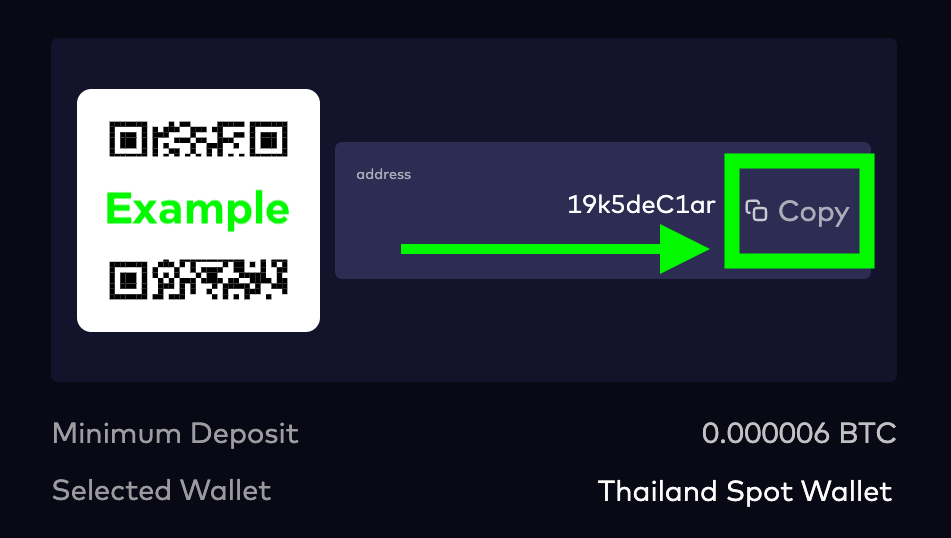
ในบางโทเคนเช่น XRP, XLM, LUNC, และ LUNA นอกจากที่อยู่กระเป๋าสตางค์แล้ว คุณยังต้องคัดลอกสิ่งที่เรียกว่า Destination Tag หรือ Memo Tag อีกด้วย โปรดตรวจสอบให้แน่ใจว่าคุณคัดลอกข้อมูลทั้ง 2 ชนิดไปยังต้นทางอย่างถูกต้อง ไม่เช่นนั้นโทเคนของคุณอาจสูญหายได้การส่งสินทรัพย์ดิจิทัลอาจใช้เวลาถึง 1 ชั่วโมง ขึ้นอยู่กับที่อยู่กระเป๋าสตางค์ และเครือข่ายที่คุณต้องการส่ง การฝากสินทรัพย์ดิจิทัลจากแพลตฟอร์มเอ็กซ์เชนจ์ (Exchange) อื่นๆอาจใช้เวลานาน เนื่องจากระบบจะต้องยืนยันการประมวลผลจากเครือข่ายบล็อกเชนInstructions for Mobile App
1. Go to the Wallet tab, select Crypto, and click on the Deposit button.
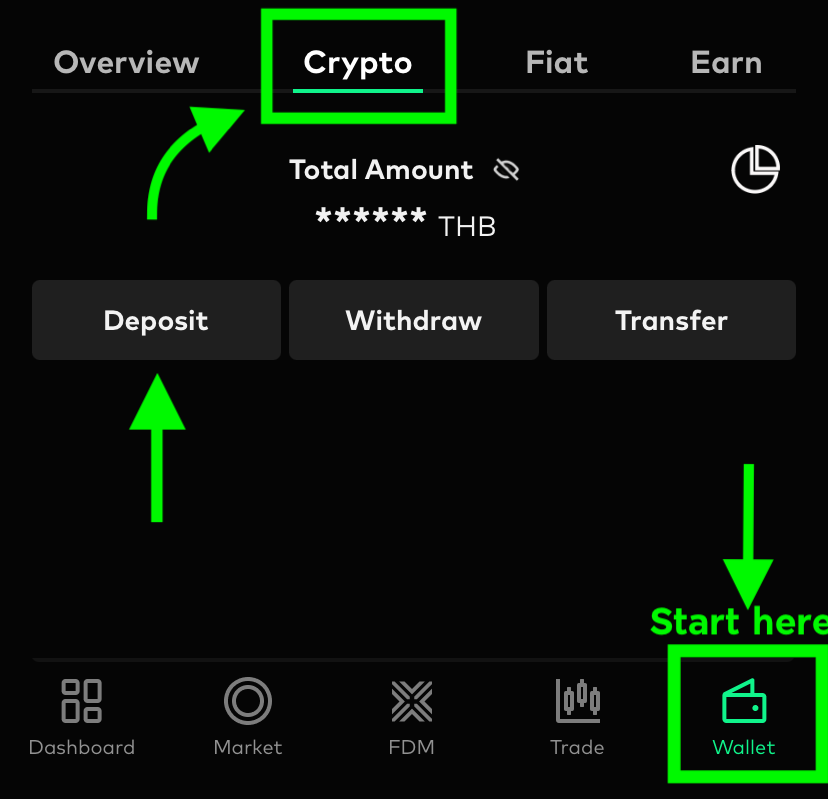
2. Choose the Crypto and Network you want to deposit, and click on Next.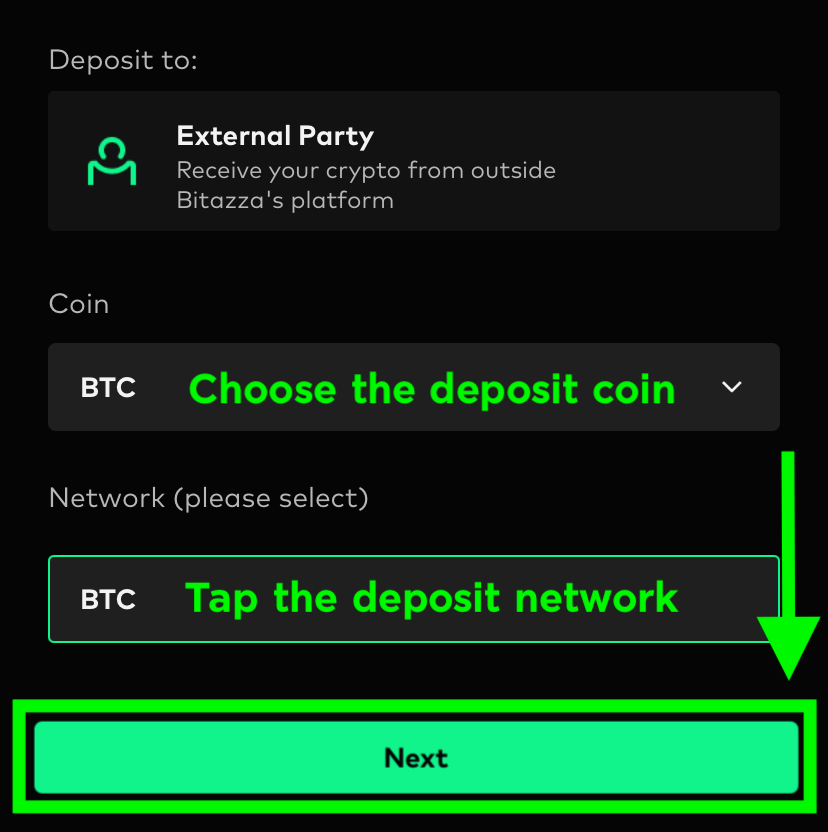
3. Then, click on the Deposit address to display the QR Code and wallet address for depositing the Crypto. You can either scan the QR Code or copy the wallet address to deposit.
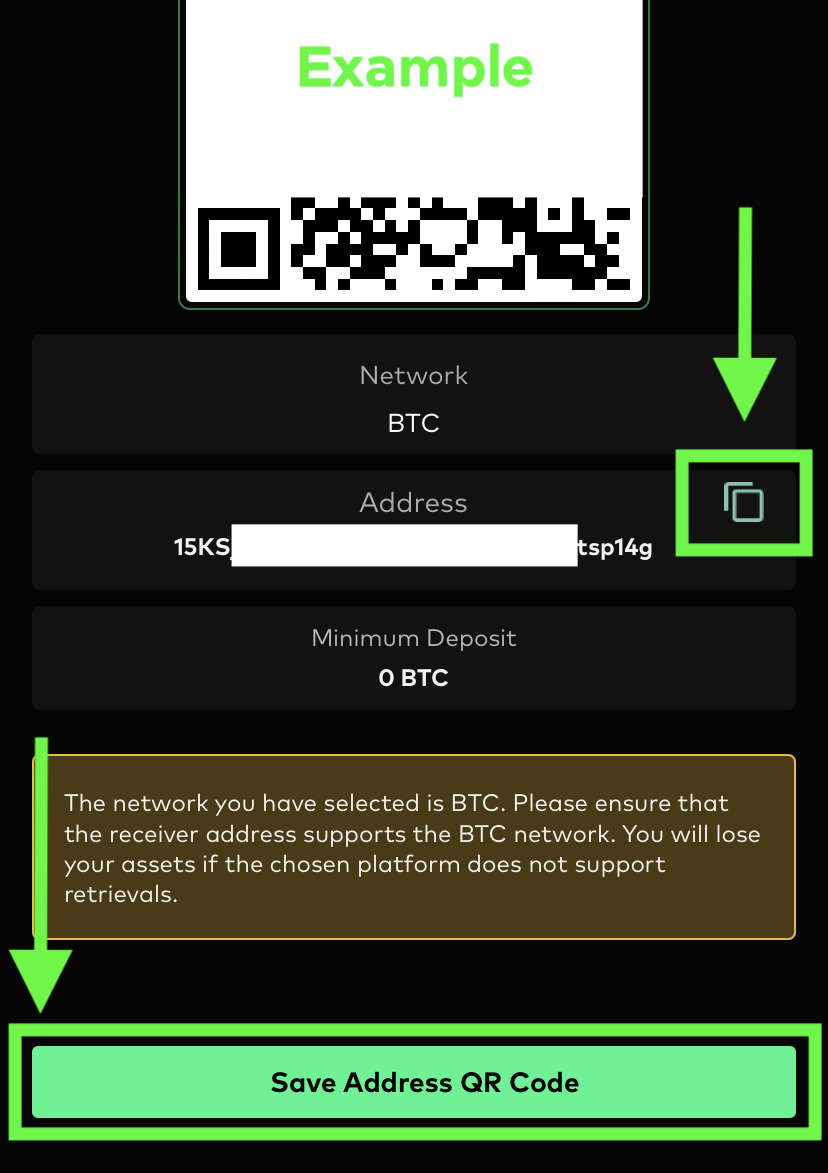
For some tokens such as XRP, XLM, LUNC, and LUNA, in addition to the Wallet Address, you may also need to copy Destination Tag or Memo Tag. Please make sure to copy both pieces of information correctly. Otherwise, your tokens may be The transfer duration may take up to an hour depending on where you are depositing the funds. Depositing from an exchange may take longer as it will require internal processing confirmations from the exchange's network.
Instructions for Web Browser
1. Click on the 'Deposit' button in your 'My Wallets' tab
2. Click the Thai Baht (THB) button, then change to the coin you wish to deposit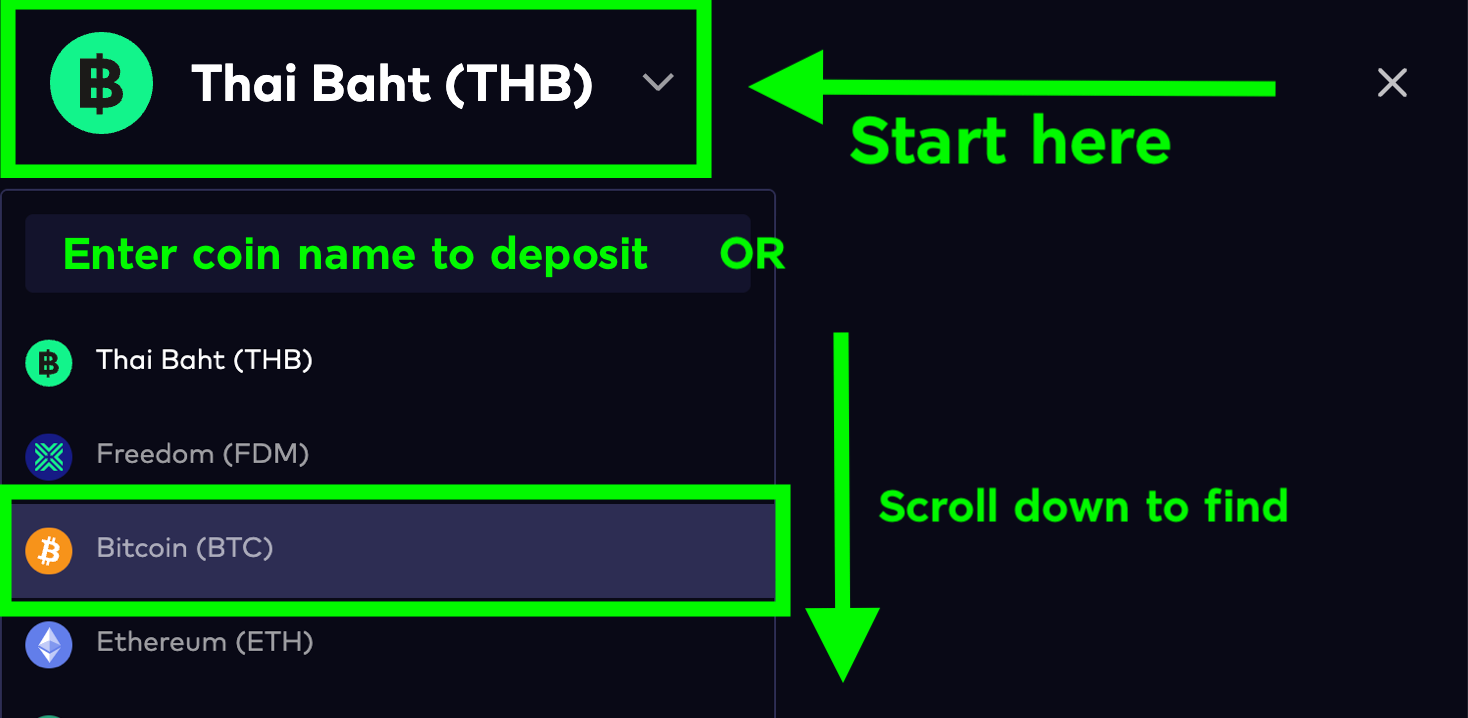
3. Choose the network that matches the source from which you want to deposit and click 'Generate Deposit Address' *Both the sender and receiver must use the same network
To copy the Wallet Address accurately, we recommend using the 'Copy' button on the right-hand side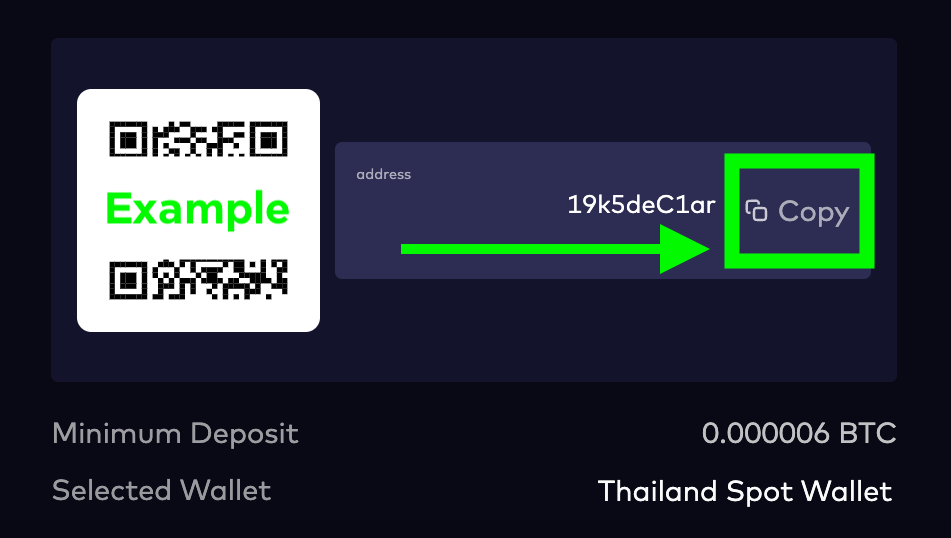
For some tokens such as XRP, XLM, LUNC, and LUNA, in addition to the Wallet Address, you may also need to copy Destination Tag or Memo Tag. Please make sure to copy both pieces of information correctly. Otherwise, your tokens may be The transfer duration may take up to an hour depending on where you are depositing the funds. Depositing from an exchange may take longer as it will require internal processing confirmations from the exchange's network.