
[ภาษาไทย] วิธีรีเซ็ตผ่านแอปพลิเคชัน | วิธีรีเซ็ตผ่านเว็บไซต์
[EN] Instructions for Web Browser | Instructions for Mobile App
ลิงก์รีเซ็ตรหัสผ่าน | Reset Password Link: https://trade.bitazza.co.th/forget-password
วิธีรีเซ็ตผ่านแอปพลิเคชัน
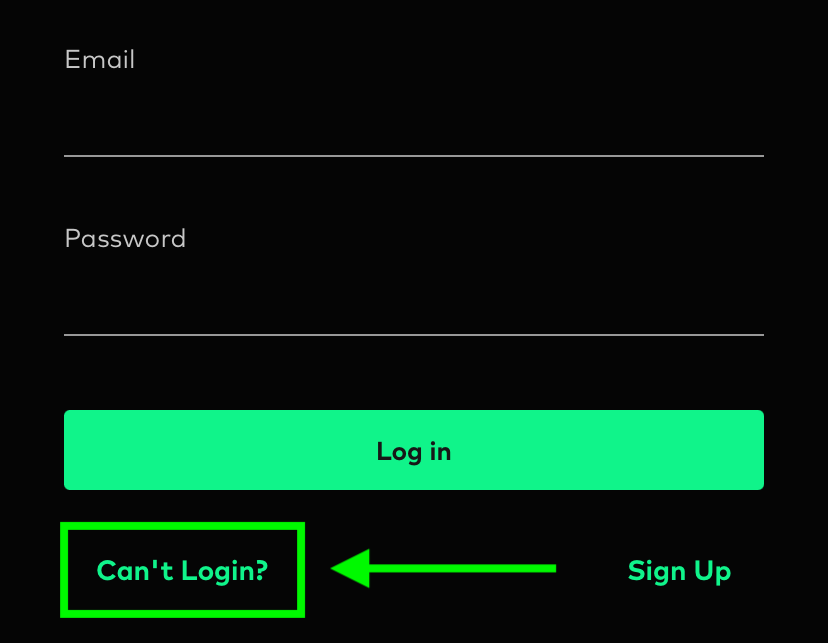
1. กรุณากดที่ปุ่มไม่สามารถเข้าสู่ระบบได้? จากหน้าการเข้าสู่ระบบ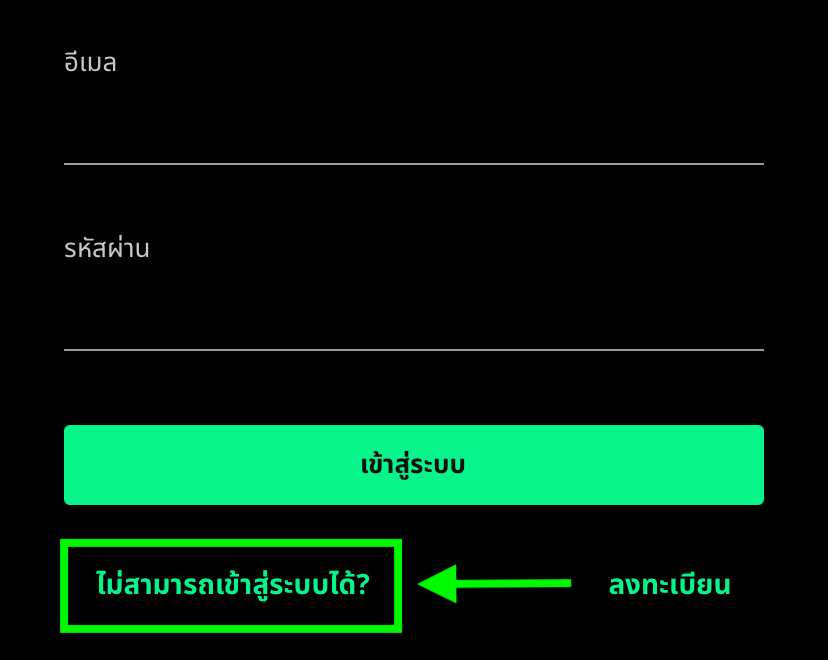
2. คลิกที่ "ฉันเป็นผู้ใช้งานอยู่แล้ว และฉันลืมรหัสผ่านของฉัน" และกรอกอีเมลที่ใช้งานบิทาซซ่าของคุณ
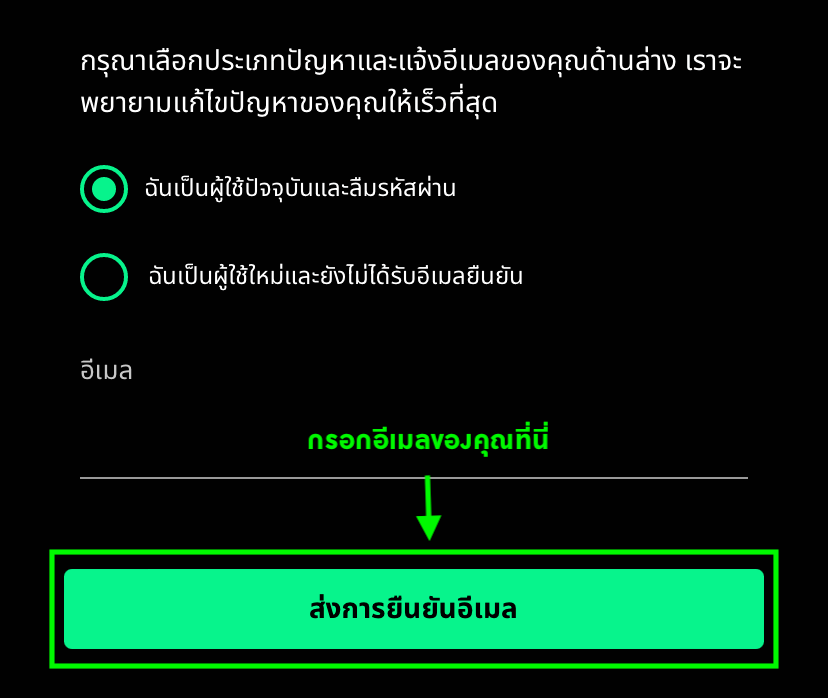
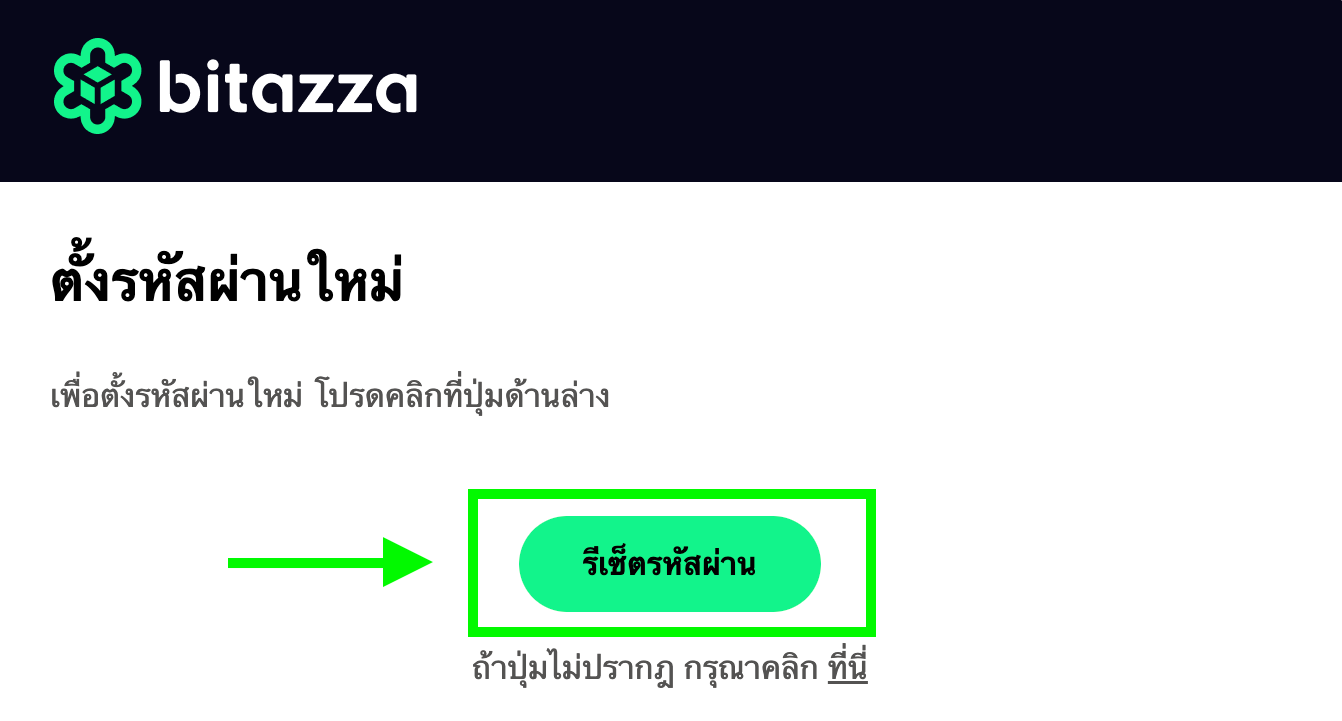
3. หลังจากกด ส่งอีเมล คุณจะได้รับอีเมลที่แนบลิงก์รีเซ็ตรหัสผ่านพร้อมวิธีการรีเซ็ตรหัสผ่าน
1. รหัสผ่านใหม่ต้องไม่ซ้ำกับรหัสผ่านเดิม
2. รหัสผ่านของคุณต้องมีความยาว 8-40 ตัวอักษร และต้องมีอย่างน้อยหนึ่ง
2.1 ตัวอักษรพิมพ์ใหญ่ (A-Z)
2.2 ตัวอักษรพิมพ์เล็ก (a-z)
2.3 ตัวเลข (0-9)
2.4 อักขระพิเศษ (@#$%!?)
ตัวอย่างเช่น B1t@zzaPW
3. ลิงก์รีเซ็ตรหัสผ่านมีอายุใช้งานเพียง 30 นาที
4. กรอกรหัสผ่านที่ต้องการในช่อง 1. New Password และ 2. Matching Password ด้วยรหัสผ่านชุดเดียวกัน
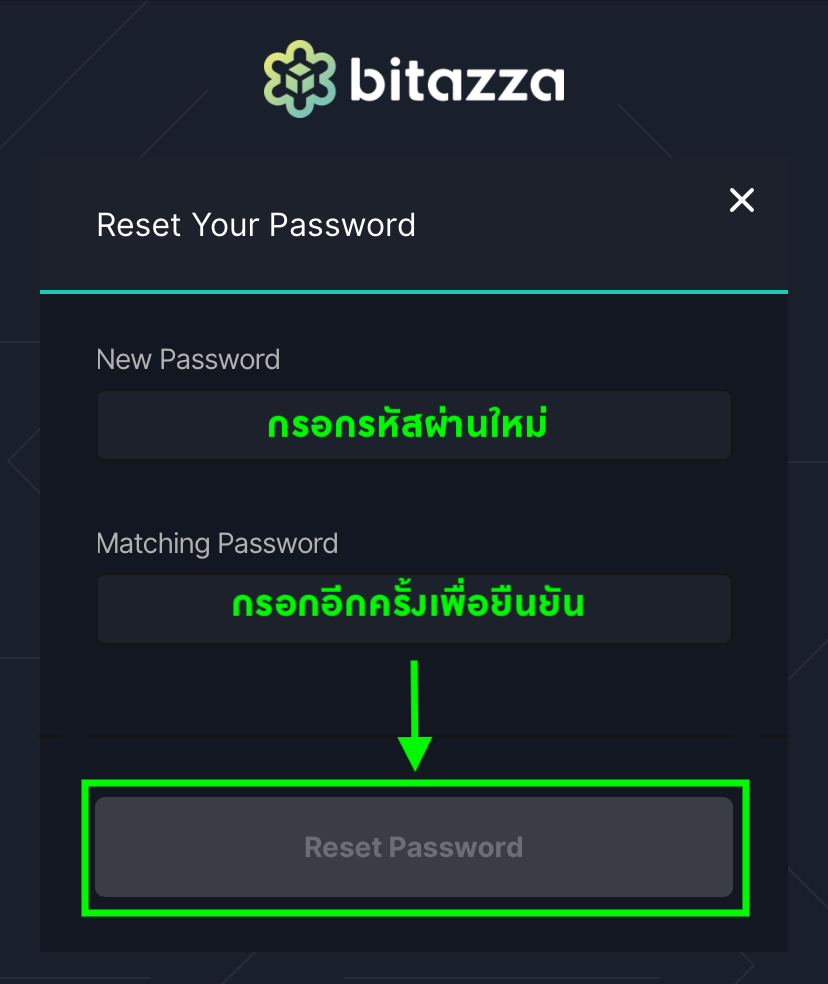
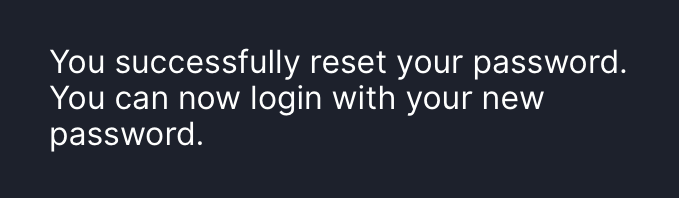
5. เมื่อรีเซ็ตรหัสผ่านเรียบร้อยแล้ว หน้าจอจะแสดงข้อความว่า 'รีเซ็ตรหัสผ่านเสร็จสิ้น' (You successfully reset your password)
หากหน้าจอแสดงข้อความอื่น เช่น:
1. Your passwords do not match หมายความว่าคุณใส่รหัสผ่านทั้ง 2 ช่องไม่ตรงกัน
2. Password Reset Avoided หมายความว่าคุณใส่รหัสผ่านใหม่ ตรงกับรหัสผ่านเก่าที่เคยตั้งไว้ โปรดเข้าลิงก์รีเซ็ตรหัสผ่านอีกครั้ง แล้วดำเนินการด้วยรหัสผ่านอื่น
3. Your password reset has expired หมายความว่าลิงก์รีเซ็ตรหัสผ่านหมดอายุแล้ว โปรดดำเนินการส่งอีเมลรีเซ็ตใหม่อีกครั้ง
ข้อสำคัญ: หากบัญชีถูกล็อกอยู่ คุณจะต้องทำการปลดล็อกบัญชีก่อนจึงจะสามารถรีเซ็ตรหัสผ่านได้
1. รหัสผ่านใหม่ต้องไม่ซ้ำกับรหัสผ่านเดิม
2. รหัสผ่านของคุณต้องมีความยาว 8-40 ตัวอักษร และต้องมีอย่างน้อยหนึ่ง
2.1 ตัวอักษรพิมพ์ใหญ่ (A-Z)
2.2 ตัวอักษรพิมพ์เล็ก (a-z)
2.3 ตัวเลข (0-9)
2.4 อักขระพิเศษ (@#$%!?)
ตัวอย่างเช่น B1t@zzaPW
3. ลิงก์รีเซ็ตรหัสผ่านมีอายุใช้งานเพียง 30 นาที
4. กรอกรหัสผ่านที่ต้องการในช่อง 1. New Password และ 2. Matching Password ด้วยรหัสผ่านชุดเดียวกัน
หากหน้าจอแสดงข้อความอื่น เช่น: 1. Your passwords do not match หมายความว่าคุณใส่รหัสผ่านทั้ง 2 ช่องไม่ตรงกัน 2. Password Reset Avoided หมายความว่าคุณใส่รหัสผ่านใหม่ ตรงกับรหัสผ่านเก่าที่เคยตั้งไว้ โปรดเข้าลิงก์รีเซ็ตรหัสผ่านอีกครั้ง แล้วดำเนินการด้วยรหัสผ่านอื่น 3. Your password reset has expired หมายความว่าลิงก์รีเซ็ตรหัสผ่านหมดอายุแล้ว โปรดดำเนินการส่งอีเมลรีเซ็ตใหม่อีกครั้ง
วิธีรีเซ็ตผ่านเว็บไซต์
1. กรุณาคลิกที่ Forgot password? จากหน้าการเข้าสู่ระบบ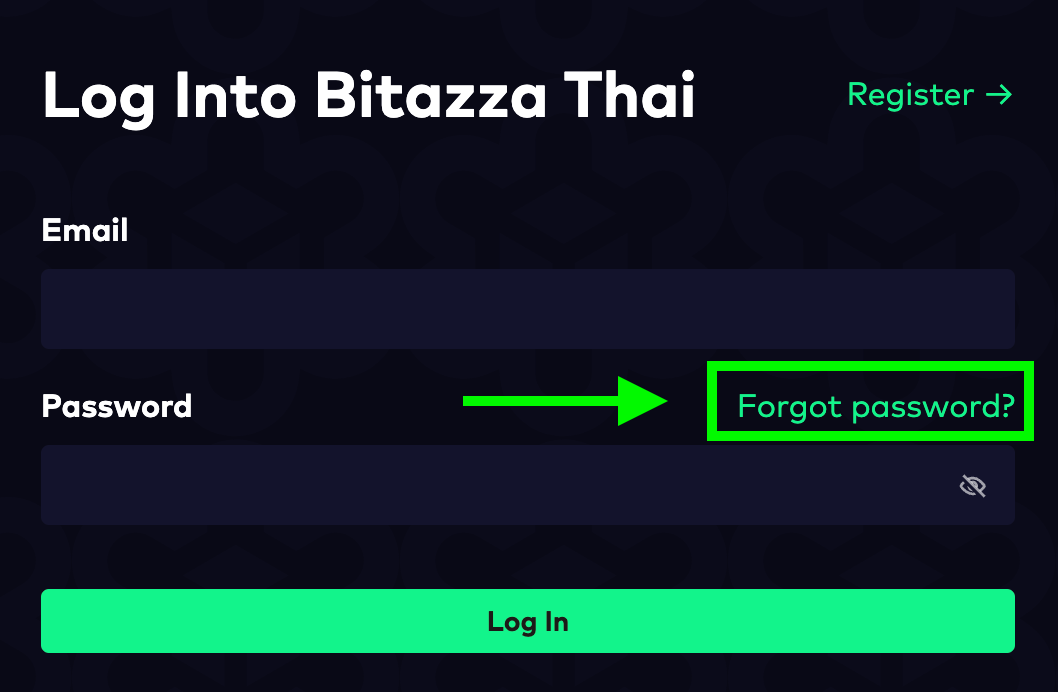
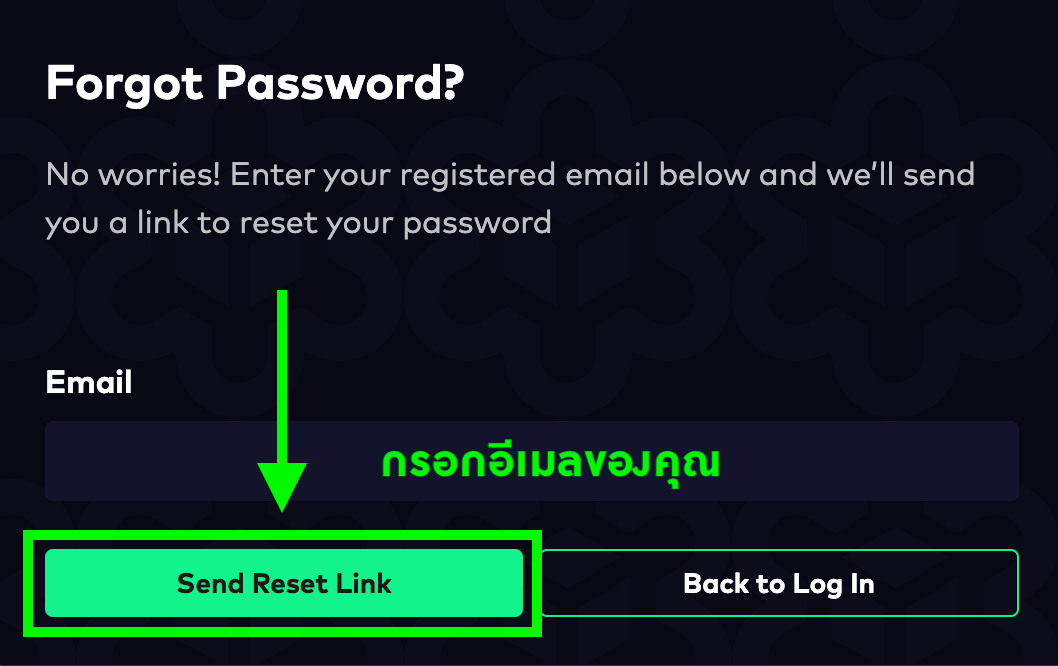
2. กรอกอีเมลที่ใช้งานบิทาซซ่าของคุณ และกดที่ 'Send Reset Link' ครับ
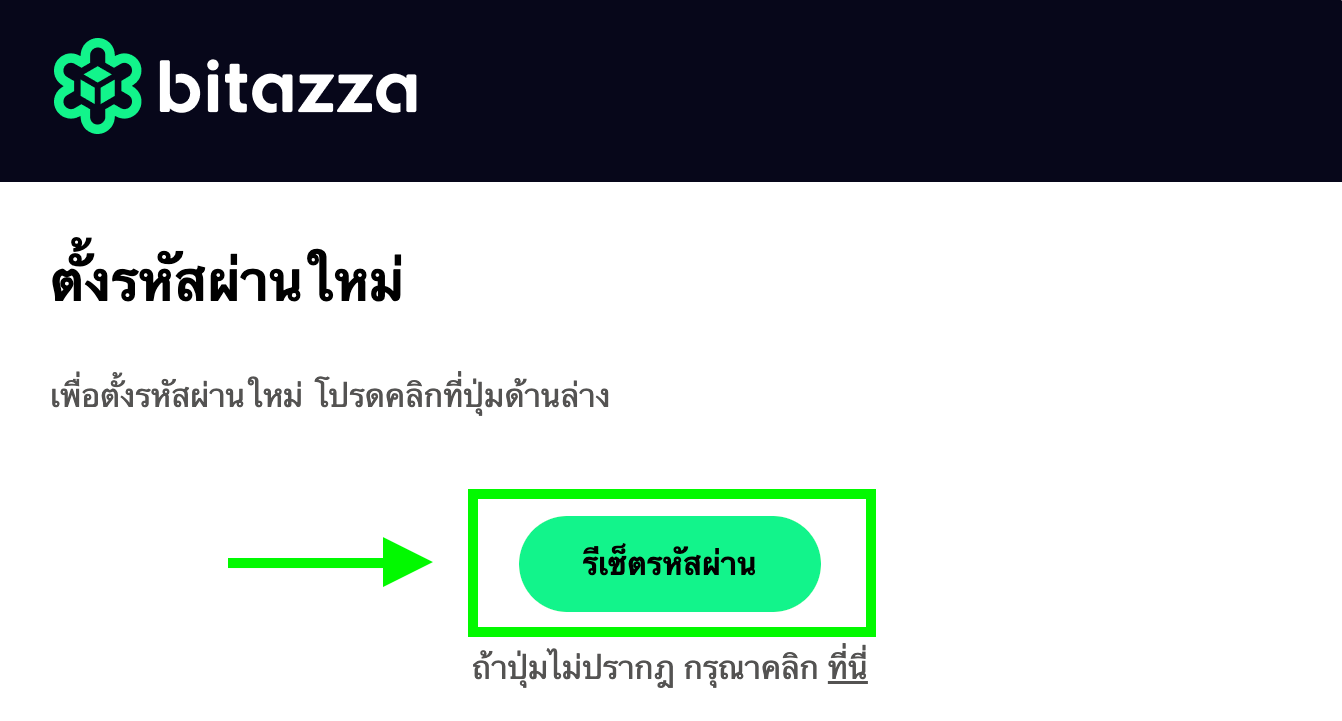
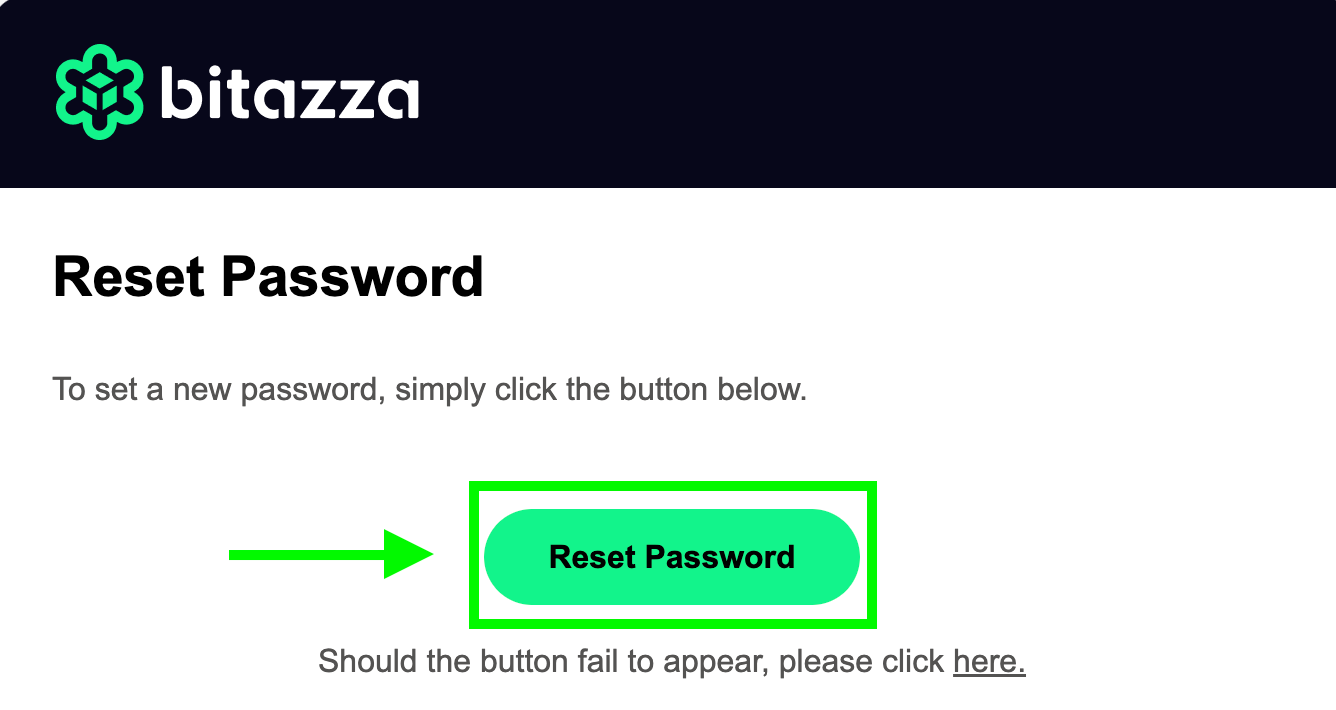
3. คุณจะได้รับอีเมลที่แนบลิงก์รีเซ็ตรหัสผ่าน กดที่ 'ตั้งรหัสผ่านใหม่'
 4. กรอกรหัสผ่านใหม่ในช่อง 'New Password' และ 'Confirm Password' ด้วยรหัสผ่านชุดเดียวกัน จากนั้นคลิกที่ 'Reset Password'
1. รหัสผ่านใหม่จะต้องไม่ซ้ำกับรหัสผ่านเดิม
2. คุณจะต้องตั้งรหัสผ่านให้มีความยาว 8-40 ตัว และประกอบด้วย
2.1 อักษรภาษาอังกฤษพิมพ์ใหญ่ (A-Z)
2.2 อักษรภาษาอังกฤษพิมพ์เล็ก (a-z)
2.3 ตัวเลข (0-9)
2.4 สัญลักษณ์ (@#$%!?)
ยกตัวอย่างเช่น B1t@zzaPW เป็นต้น
3. ลิงก์รีเซ็ตรหัสผ่านมีอายุเพียง 30 นาที
5. หน้าจอจะแสดงข้อความว่า 'รีเซ็ตรหัสผ่านเสร็จสิ้น' (Password Reset Successful) เป็นอันจบขั้นตอน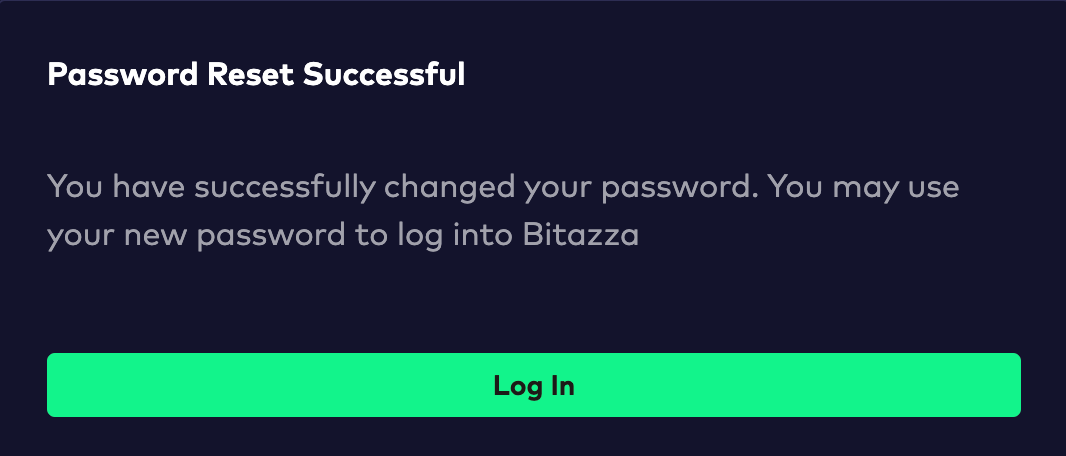
หากหน้าจอแสดงข้อความอื่น เช่น:
1. Your passwords do not match หมายความว่าคุณใส่รหัสผ่านทั้ง 2 ช่องไม่ตรงกัน
2. Password Reset Avoided หมายความว่าคุณใส่รหัสผ่านใหม่ ตรงกับรหัสผ่านเก่าที่เคยตั้งไว้ โปรดเข้าลิงก์รีเซ็ตรหัสผ่านอีกครั้ง แล้วดำเนินการด้วยรหัสผ่านอื่น
3. Your password reset has expired หมายความว่าลิงก์รีเซ็ตรหัสผ่านหมดอายุแล้ว โปรดดำเนินการส่งอีเมลรีเซ็ตใหม่อีกครั้ง
ข้อสำคัญ: หากบัญชีถูกล็อกอยู่ คุณจะต้องทำการปลดล็อกบัญชีก่อนจึงจะสามารถรีเซ็ตรหัสผ่านได้Instructions for Mobile App
1. Click Can't Login button on the login page.
2. Click I am an existing user, and I forgot my password. and enter your Bitazza registered email.
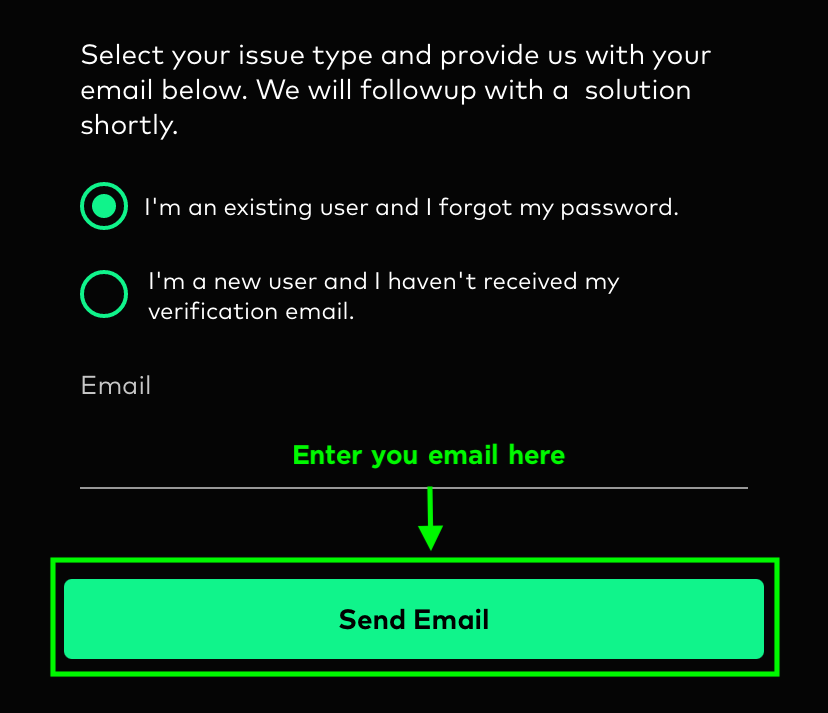
3. After clicking Send Email you will receive an email with a password reset link and instructions on how to reset your password.
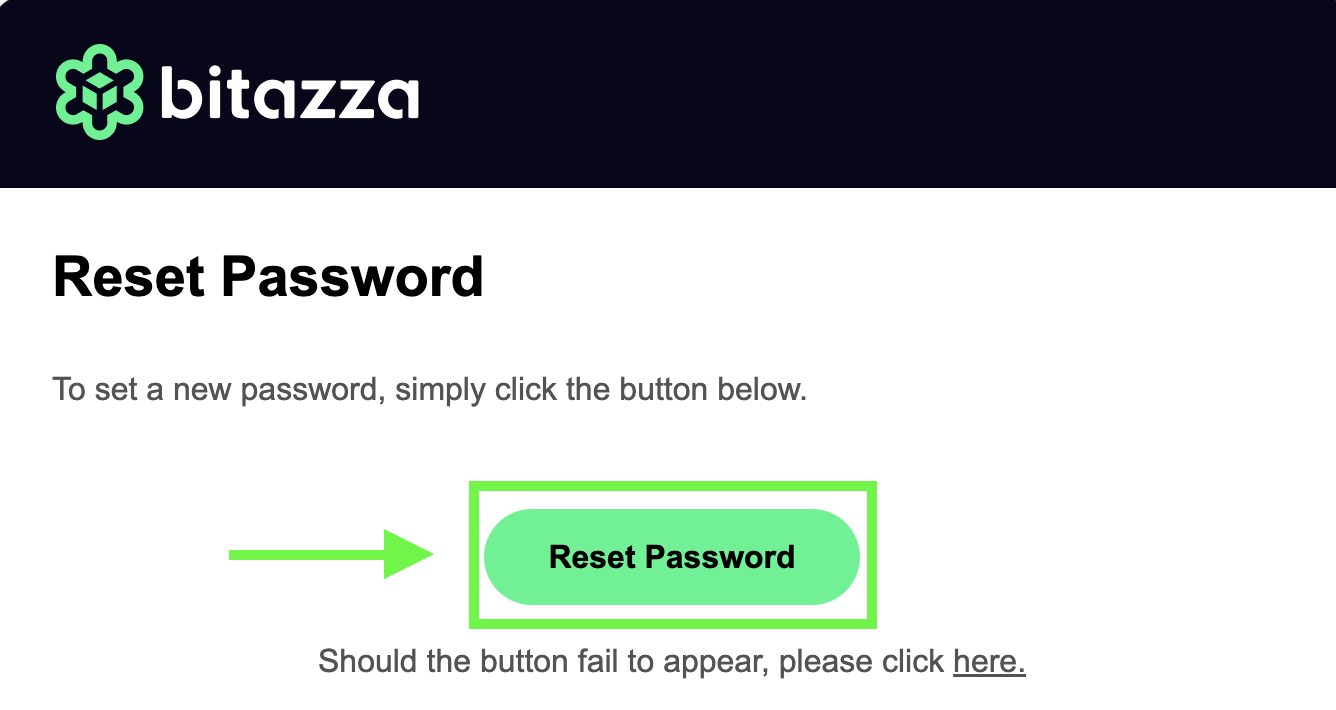
1. The new password must not be the same as the old one.
2. Your password must be 8-40 characters long and include at least one
2.1 Uppercase letter (A-Z)
2.2 Lowercase letter (a-z)
2.3 Number (0-9)
2.4 Special character (@#$%!?)
For example, B1t@zzaPW
3. The password reset link is valid for only 30 minutes.
4. Fill the 1. New Password and 2. Matching Password boxes with the same password as you desire. The password must be 8-40 characters long, contain at least one uppercase letter, one lowercase letter, one number, and one symbol. For example: B1t@zzaPW.
2. Your password must be 8-40 characters long and include at least one
2.1 Uppercase letter (A-Z)
2.2 Lowercase letter (a-z)
2.3 Number (0-9)
2.4 Special character (@#$%!?)
For example, B1t@zzaPW
3. The password reset link is valid for only 30 minutes.
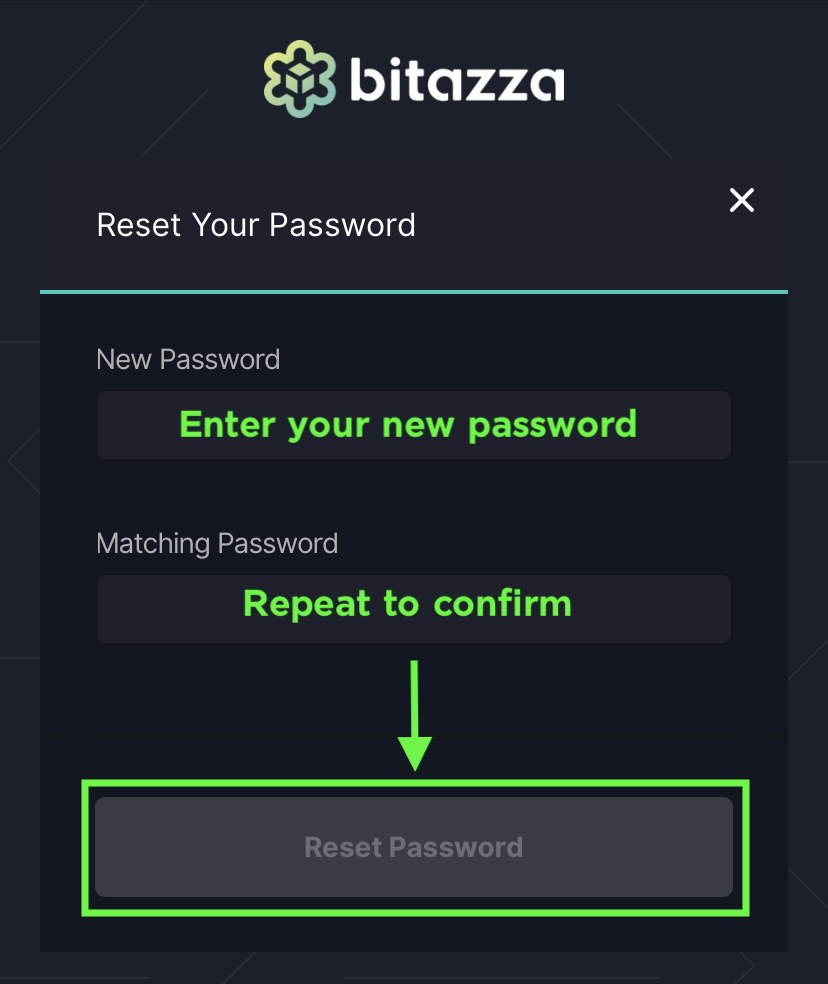
5. Once you have successfully reset your password, the screen will display the message 'You successfully reset your password.'
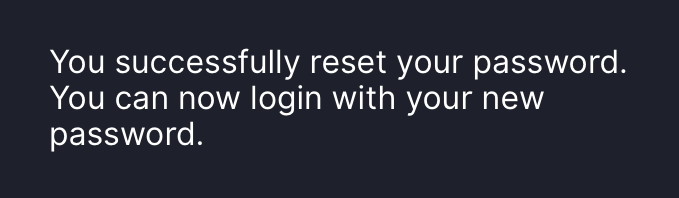
If the screen shows any other messages, such as:
1. Your passwords do not match, check both password boxes and try again
2. Password Reset Avoided, please click the password reset link again and proceed with a different password
3. Your password reset has expired, it means that the password reset link has expired. Please proceed to send a new one
Important Note:
If your account is locked, you are required to unlock it first in order to reset your password.
Instructions for Web Browser
1. Click Forgot password? button on the login page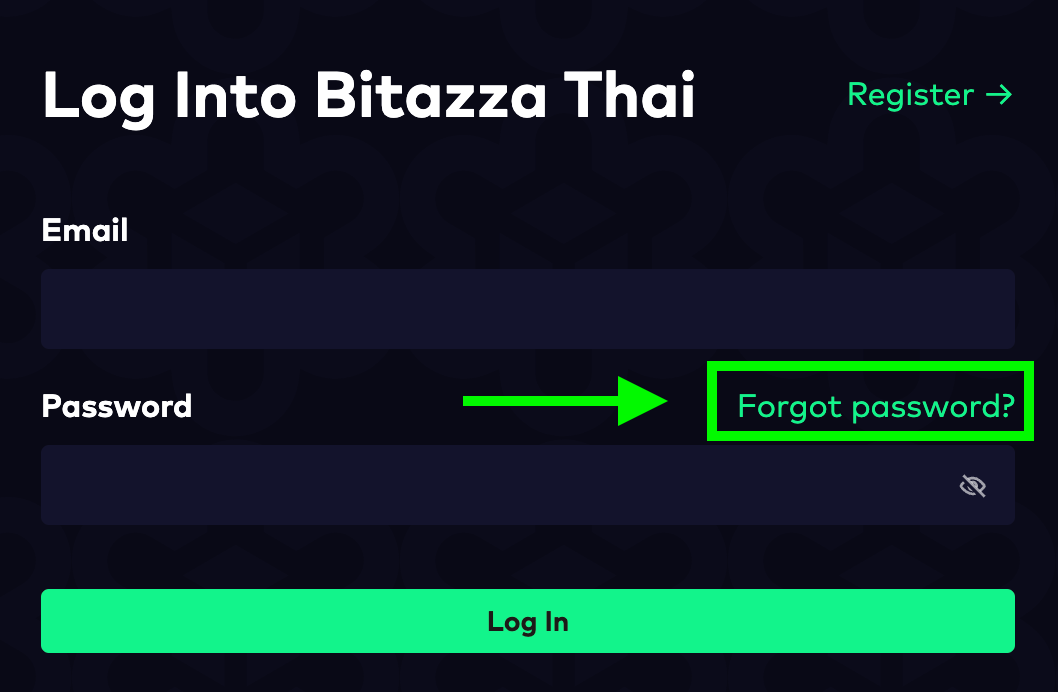
2. Enter your Bitazza registered email, and click 'Send Reset Link'
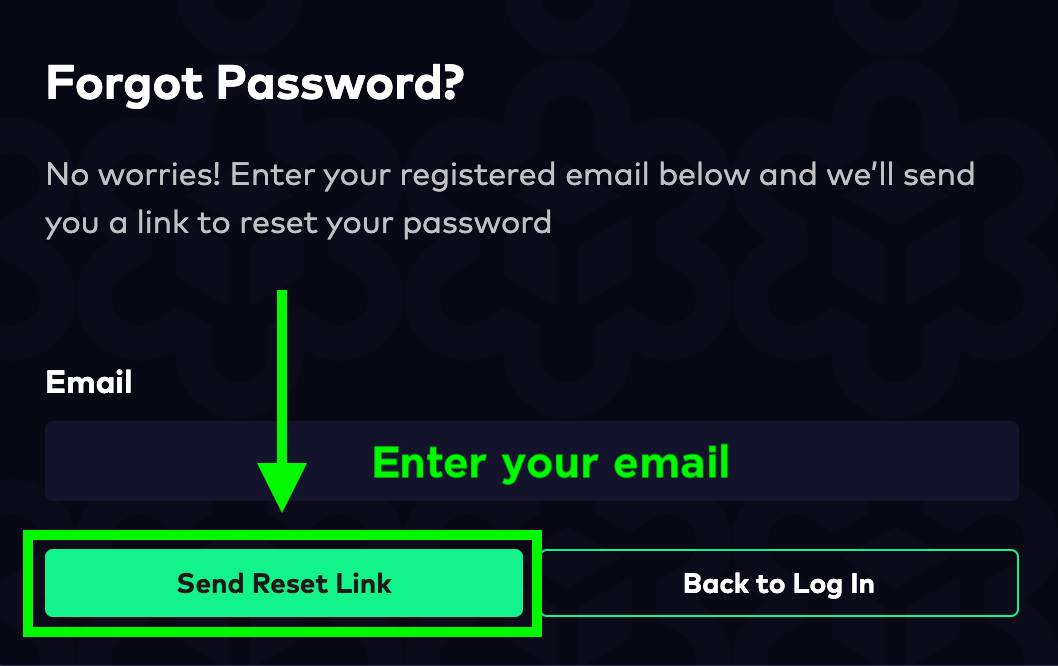
3. You will receive an email with a password reset link. Click 'Reset Password'
4. Fill the 'New Password' and 'Confirm Password' boxes with the same password, then click 'Reset Password'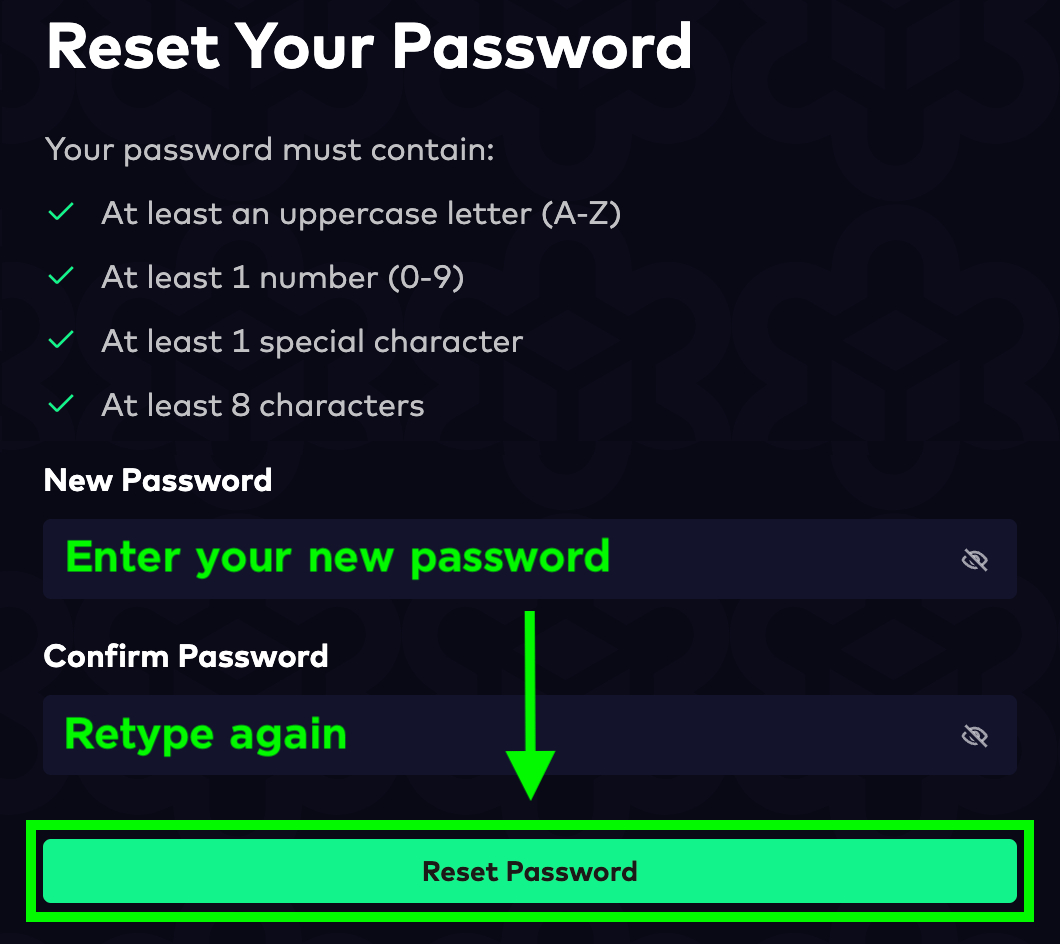
1. The new password must not be the same as the old one
2. Your password must be 8-40 characters long and include at least one
2.1 Uppercase letter (A-Z)
2.2 Lowercase letter (a-z)
2.3 Number (0-9)
2.4 Special character (@#$%!?)
For example, B1t@zzaPW
3. The password reset link is valid for only 30 minutes.
5. Finished! The screen will display the message: 'Password Reset Successful'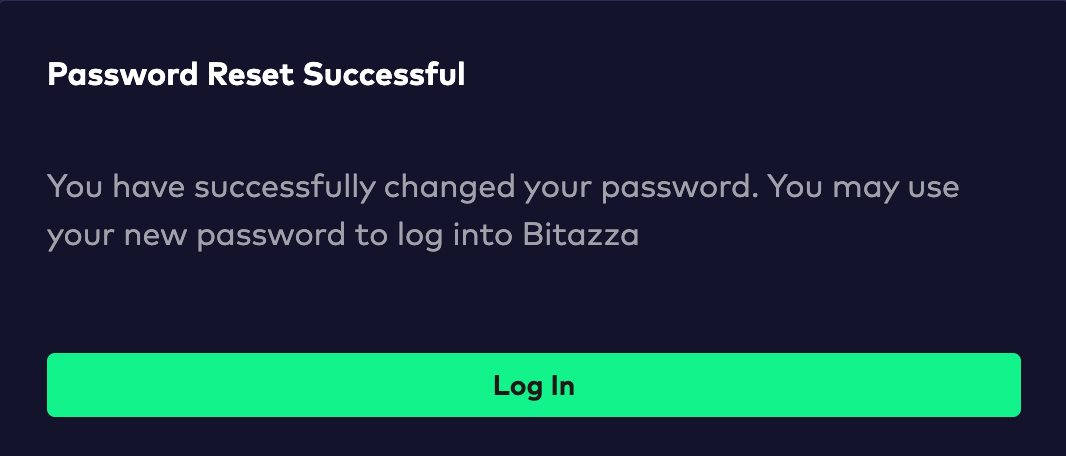
If the screen shows any other messages, such as:
1. Your passwords do not match, check both password boxes and try again
2. Password Reset Avoided, please click the password reset link again and proceed with a different password
3. Your password reset has expired, it means that the password reset link has expired. Please proceed to send a new one
Important Note:
If your account is locked, you are required to unlock it first in order to reset your password.